opc.php
PHP-Script für /stats/ mit Tooltips, Balkenanzeige und Auto-Refresh
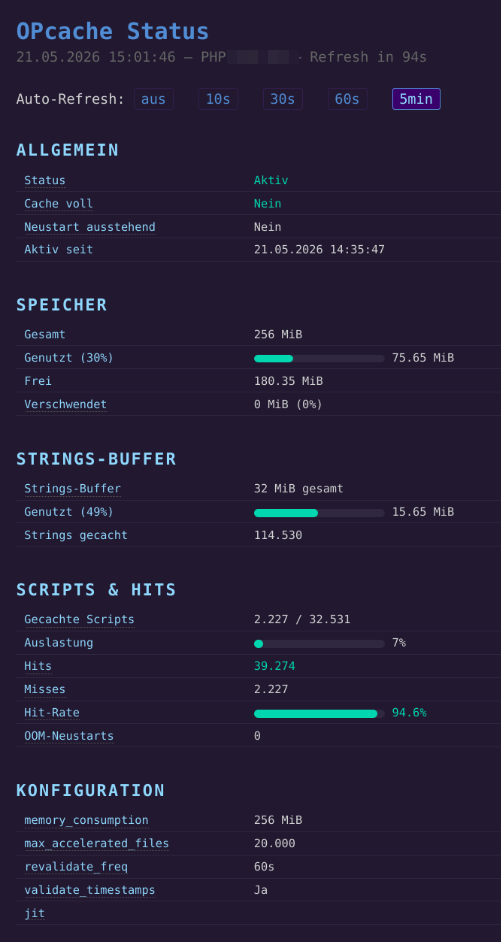
opc.php ist ein einzelnes PHP-Script, das den OPcache-Status als übersichtliche HTML-Seite darstellt: Speicherauslastung, Hit-Rate, gecachte Scripts, aktive Konfiguration. Tooltips erklären jeden Wert direkt, ein Auto-Refresh-Schalter lässt die Seite in frei wählbarem Intervall neu laden.
Voraussetzungen
- PHP mit aktivem OPcache (
opcache.enable=1inphp.ini) - Das Script muss von dem PHP-Prozess bedient werden, dessen Cache man sehen möchte. Bei FastCGI- oder FPM-Setups also im Webroot ablegen und per Browser aufrufen, nicht per CLI.
Installation
Script nach /var/www/example.de/web/stats/opc.php kopieren. Das Verzeichnis /stats/ per .htaccess schützen, sonst sind PHP-Version und Cache-Details öffentlich sichtbar.
Funktionen
Allgemein: Zeigt ob OPcache aktiv ist, ob der Cache voll läuft und seit wann der Prozess läuft.
Speicher: Genutzter, freier und verschwendeter Speicher als Balkenanzeige. Verschwendeter Speicher entsteht, wenn Scripts aus dem Cache entfernt werden, der Speicher aber erst beim nächsten Neustart freigegeben wird.
Strings-Buffer: Separater Speicherbereich für wiederverwendete Strings (Funktionsnamen, Variablen). Konfiguriert via opcache.interned_strings_buffer.
Scripts und Hits: Anzahl gecachter Scripts, Hits, Misses und Hit-Rate. Die Hit-Rate färbt sich ab 90 % grün, darunter orange.
Konfiguration: Zeigt die aktiven Werte für memory_consumption, max_accelerated_files, revalidate_freq, validate_timestamps und jit.
Auto-Refresh
Die Seite kann sich automatisch neu laden. Entweder über die Buttons auf der Seite oder direkt per URL:
https://example.de/stats/opc.php?auto=30
Erlaubte Werte: 5 bis 3600 Sekunden. Ein Countdown in der Kopfzeile zeigt die verbleibende Zeit.
Hinweis zu CLI und FPM
php -r "var_dump(opcache_get_status());"
das Script:
<?php
$s = opcache_get_status(false);
$c = opcache_get_configuration()['directives'];
$mem_total = $s['memory_usage']['used_memory'] + $s['memory_usage']['free_memory'] + $s['memory_usage']['wasted_memory'];
$mem_used_pct = round($s['memory_usage']['used_memory'] / $mem_total * 100);
$hits = $s['opcache_statistics']['hits'];
$misses = $s['opcache_statistics']['misses'];
$hit_rate = ($hits + $misses) > 0 ? round($hits / ($hits + $misses) * 100, 1) : 0;
$auto = 0;
if (isset($_GET['auto'])) {
$auto = max(5, min(3600, (int)$_GET['auto']));
}
function mb(int $bytes): string {
return round($bytes / 1024 / 1024, 2) . ' MiB';
}
function bar(int $pct, string $color = '#4ec9b0'): string {
return '<div class="bar-bg"><div class="bar-fill" style="width:' . $pct . '%;background:' . $color . '"></div></div>';
}
function tip(string $label, string $tip): string {
return '<span class="tip" data-tip="' . htmlspecialchars($tip) . '">' . $label . '</span>';
}
?>
<!DOCTYPE html>
<html lang="de">
<head>
<meta charset="UTF-8">
<title>OPcache Status</title>
<?php if ($auto > 0): ?>
<meta http-equiv="refresh" content="<?= $auto ?>">
<?php endif; ?>
<style>
body { font-family: monospace; background: #1a1a2e; color: #d4d4d4; padding: 2rem; margin: 0; }
h1 { color: #569cd6; margin-bottom: 0.2rem; }
.sub { color: #666; font-size: 0.85rem; margin-bottom: 1.5rem; }
.controls { margin-bottom: 2rem; font-size: 0.85rem; }
.controls a { color: #569cd6; text-decoration: none; margin-right: 1rem; padding: 2px 8px; border: 1px solid #2a2a4e; border-radius: 3px; }
.controls a:hover { background: #2a2a4e; }
.controls a.active { background: #2a2a6e; border-color: #569cd6; color: #9cdcfe; }
.countdown { color: #666; font-size: 0.8rem; margin-left: 0.5rem; }
h2 { color: #9cdcfe; margin: 2rem 0 0.5rem; font-size: 1rem; text-transform: uppercase; letter-spacing: 0.1em; }
table { border-collapse: collapse; width: 100%; max-width: 640px; }
td { padding: 5px 10px; border-bottom: 1px solid #2a2a3e; vertical-align: middle; }
td:first-child { color: #9cdcfe; width: 260px; }
.ok { color: #4ec9b0; }
.warn { color: #ce9178; }
.bar-bg { background: #2a2a3e; height: 10px; border-radius: 5px; min-width: 160px; display: inline-block; vertical-align: middle; width: 140px; }
.bar-fill { height: 10px; border-radius: 5px; }
.tip { border-bottom: 1px dotted #555; cursor: help; position: relative; }
.tip:hover::after {
content: attr(data-tip);
position: absolute;
left: 0; top: 1.4em;
background: #2a2a4e;
border: 1px solid #569cd6;
color: #d4d4d4;
padding: 6px 10px;
border-radius: 4px;
font-size: 0.8rem;
white-space: pre-wrap;
max-width: 340px;
z-index: 10;
line-height: 1.5;
}
</style>
</head>
<body>
<h1>OPcache Status</h1>
<div class="sub"><?= date('d.m.Y H:i:s') ?> — PHP <?= PHP_VERSION ?><?php if ($auto > 0): ?> — <span id="cd"></span><?php endif; ?></div>
<div class="controls">
Auto-Refresh:
<a href="?">aus</a>
<a href="?auto=10" <?= $auto === 10 ? 'class="active"' : '' ?>>10s</a>
<a href="?auto=30" <?= $auto === 30 ? 'class="active"' : '' ?>>30s</a>
<a href="?auto=60" <?= $auto === 60 ? 'class="active"' : '' ?>>60s</a>
<a href="?auto=300" <?= $auto === 300 ? 'class="active"' : '' ?>>5min</a>
</div>
<h2>Allgemein</h2>
<table>
<tr><td><?= tip('Status', 'OPcache ist aktiv oder deaktiviert. Ohne OPcache kompiliert PHP jeden Request neu.') ?></td><td class="<?= $s['opcache_enabled'] ? 'ok' : 'warn' ?>"><?= $s['opcache_enabled'] ? 'Aktiv' : 'Deaktiviert' ?></td></tr>
<tr><td><?= tip('Cache voll', 'Wenn der Cache voll ist, werden keine neuen Scripts mehr gecacht. Speicher erhoehen oder opcache.max_accelerated_files anpassen.') ?></td><td class="<?= $s['cache_full'] ? 'warn' : 'ok' ?>"><?= $s['cache_full'] ? 'Ja' : 'Nein' ?></td></tr>
<tr><td><?= tip('Neustart ausstehend', 'Ein Neustart wurde angefordert (z.B. nach opcache_reset()), laeuft aber noch ab.')
Liefert im Terminal NULL, weil der CLI-PHP-Prozess einen eigenen, separaten OPcache hat. Der Browser-Aufruf trifft den tatsächlich aktiven Prozess.
Wer PHP-FPM einsetzt, kann alternativ cachetool direkt auf den Socket loslassen:
php cachetool.phar opcache:status --fcgi=/run/php/php8.3-fpm.sock